Posts

Showing posts with the label GAMES

Java program to play Rock, Paper and Scissors with computer.

Image
import java.lang.*; import java.util.Scanner; import java.util.Random; public class RPS{          public int user_score =0 , comp_score = 0;     public String user_choice, comp_choice;     Random ran;     Scanner scan;     public RPS(){         ran = new Random();         scan = new Scanner(System.in);     }     public void userTurn(){         System.out.println("\n[1] Rock , [2] Paper , [3] Scissors");         System.out.print("Choice > ");         user_choice = whatIsIt(scan.nextInt() - 1);     }     public void machineTurn(){         comp_choice = whatIsIt(ran.nextInt(3) + 1);     }     public Str...

Stone, Paper and Scissors game | Python Program

Image
Stone, Paper and Scissors game:  Tips:     1."import random" from library file.     2.Use nested if and else     3.You should know stone, paper and scissor game. Code: import random print("Hello!!\nPlay Rock! Paper! Scissor!\nUser v/s Computer.") print('Who ever wins 5 times first becomes the winner of the game.') player_count=0 comp_count=0 while(True): if player_count>=5 or comp_count>=5: break; x=random.choice(['rock','paper','scissor']) print("\nComp = "+str(comp_count)+" | You = "+str(player_count)+"\nEnter your choice:",end=' ') n=input() if(n!=x): print("\ncomputer choose:",x) print("you choose:",n,"\n") if(x=='rock' and n=='paper'): print("you win!") player_count=player_count+1 elif(x=='paper' and n=='scissor')...

Guess The Number | Game | Python Program

Image
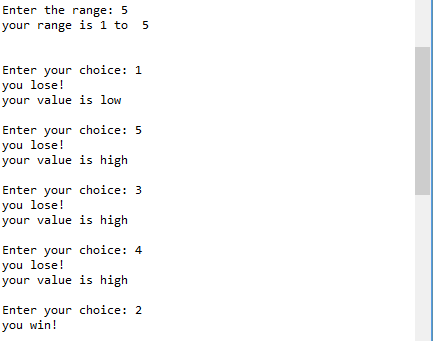
Guessing number : Tips: 1.Import random, use it. 2.Take user given range. 3.Take user given number. 4.Use if and else.   Code: import random x=int(input('Enter the range: ')) a=random.randint(1,x) print('your range is 1 to ',x,'\n') while(1): n=int(input('Enter your choice: ')) if(n!=a): print('you lose!') if(n>a): print('your value is high') else: print('your value is low') else: print('you win!') break Output: If you love this program or any question comment. Visit again.